Local Authorisation
To support federated authentication and tight access control, Cafe Variome V4 uses fully local authorisation model based on access groups. This allows administrators to define fine-grained access control policies for datasets and other resources, independent of the authentication method used.
Access Groups
An access group grants a set of users the same level access to networks and data sources. There are multiple types of access groups in Cafe Variome V4:
- Static Groups: The simplest type of access group, where users are manually added or removed by administrators. Useful for small teams or specific projects.
- Email Groups: Users are automatically added to the group based on their email domain. A regex to match the email domain must be provided. Useful for organisations where users share a common email domain.
- OIDC Claim Groups: Users are added to the group based on claims in their OIDC token, such as group membership or roles. This requires an OIDC provider to be configured and is useful for integrating with institutional identity systems.
- OIDC Attribute Groups: Similar to OIDC Claim Groups, but based on custom attributes in the OIDC token. This works when the group membership is used in other connected systems and cannot be freely modified. However, when using this type of group, ensure that the attribute is not user-modifiable to prevent privilege escalation.
An access group also contains a list of data sources and networks that the group has access to. They are always a finite list instead of a matching rule, to ensure that access control checks are efficient.
Access Levels and overrides
There are multiple levels of access that can be granted to an access group for a data source or network:
- No Access: The group has no access to the data source or network. This is the default level if no access is granted.
- Boolean Access: The group can see the existence of the data, but cannot see any details. For example, when running a query, the user will see "this data source has matching records", but cannot see the actual records or the count.
- Range Access: PLACEHOLDER FOR FUTURE USE The group can see a range of counts or summaries, but not the exact details. For example, when running a query, the user will see "this data source has between 10 and 100 matching records", but cannot see the actual records or the exact count. A roadmap item is to implement differential privacy automatic range calculation for this access level.
- Count Access: The group can see the exact count of matching records, but not the actual records. For example, when running a query, the user will see "this data source has 42 matching records", but cannot see the actual records.
- Record Access: The group can see the actual records, limited to the fields they are allowed to see in the access group configuration. Additionally, if the data source supports it, this group can request data handoff to download the records directly.
The access of a user to a data source or network is determined by the highest access level granted to any of the access groups they belong to. For example, if a user has an email address matching an Email Group with Boolean Access to a data source, but is also a member of a Static Group with Record Access to the same data source, they will have Record Access. Currently there are no negative access levels or deny rules, so access can only be granted, not revoked.
Managing Access Groups
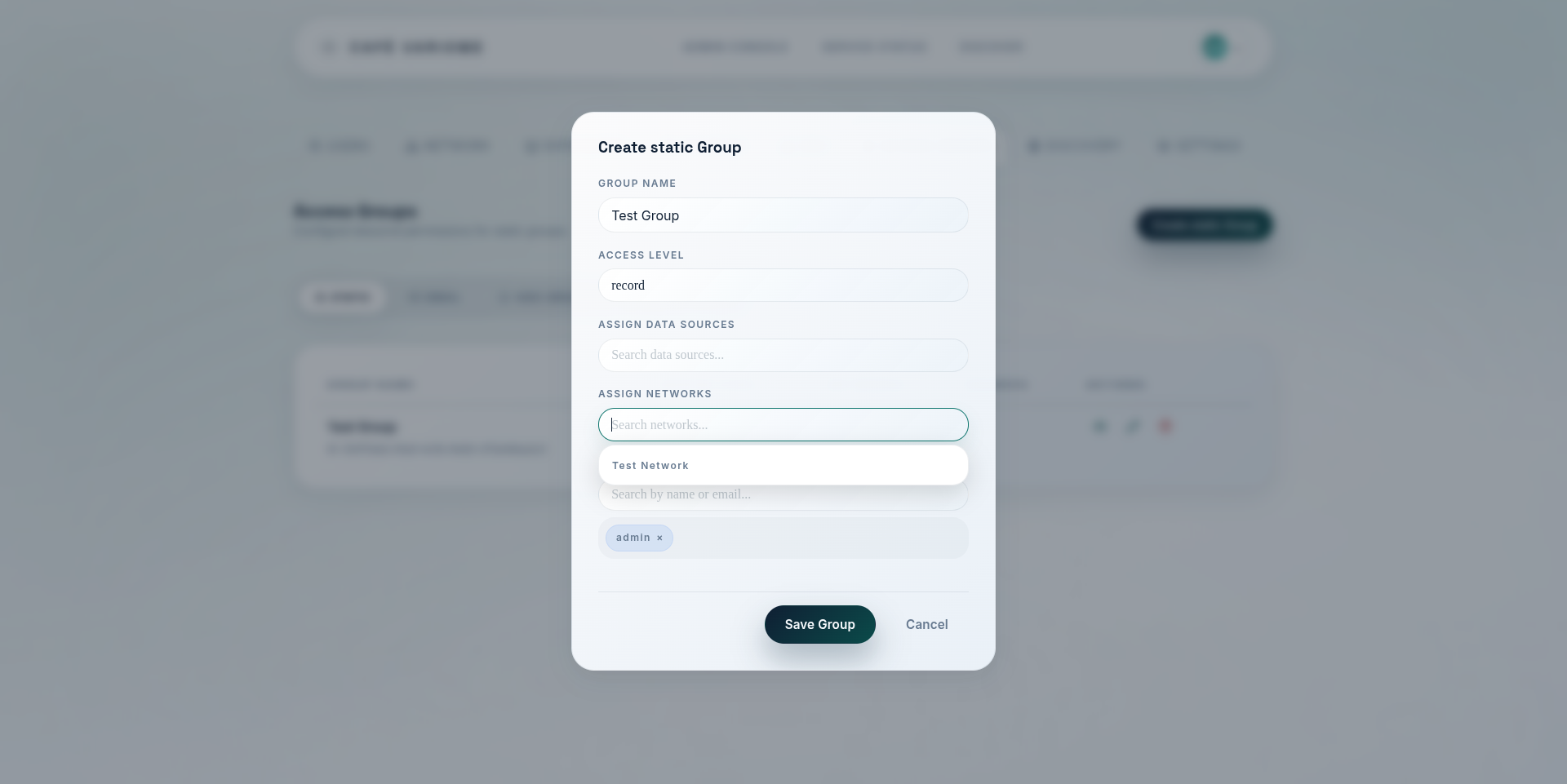
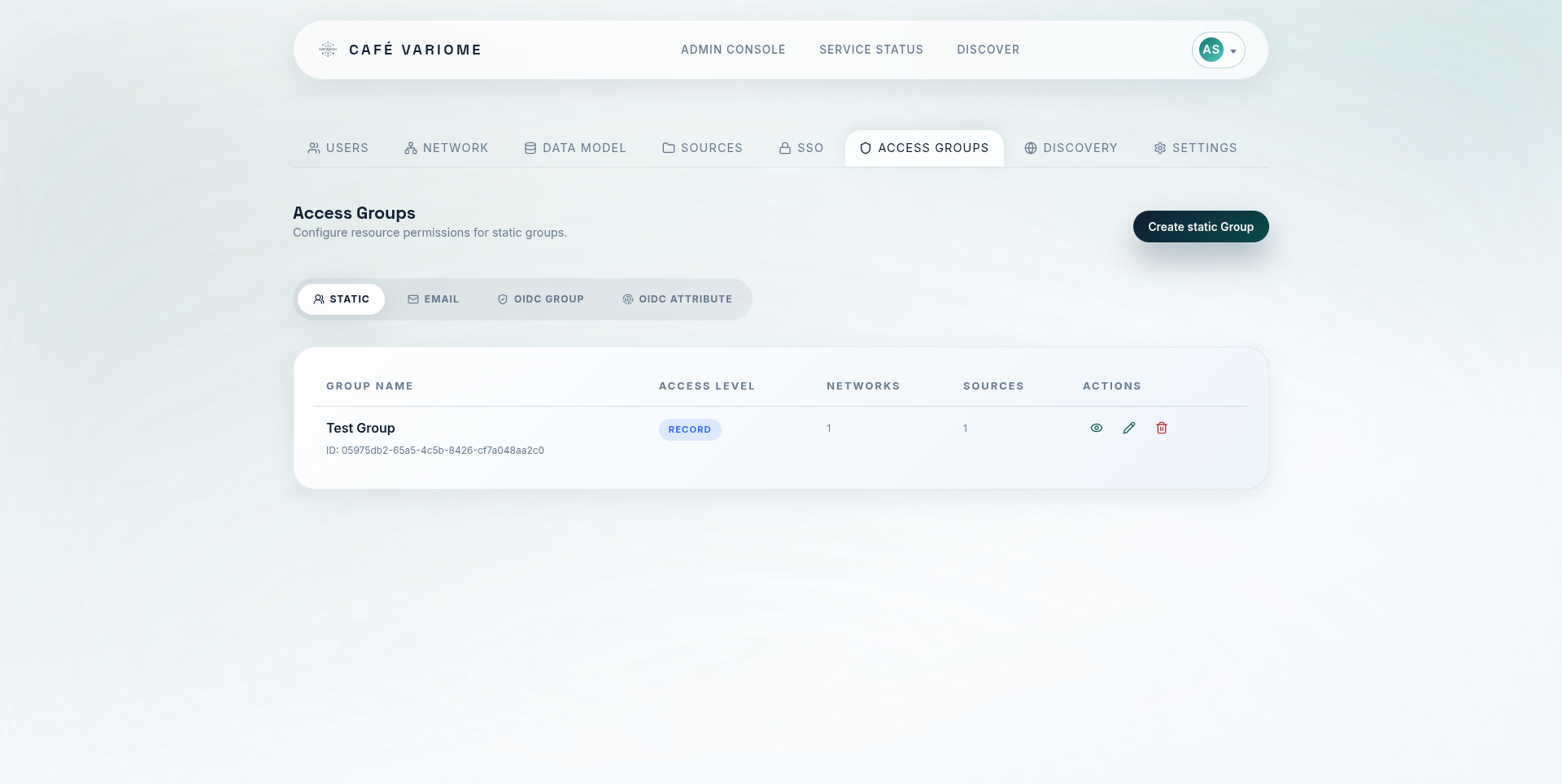
Access groups are created and managed by administrators through the admin interface. When creating or editing an access group, administrators can specify the type of group, the criteria for membership (if applicable), and the data sources and networks that the group has access to. Administrators can also view the list of users in each group and their access levels. As is shown in the screenshots below:
Remote permissioning and access synchronisation
In special use cases, such as when integrating with external identity providers or federated systems, it may be necessary to synchronise access group membership and permissions from remote sources. The OIDC Claim Groups and OIDC Attribute Groups provide a mechanism for this, allowing users to be automatically added to access groups based on their identity attributes. In a rarer use case, one instance of Cafe Variome V4 may act as a permissioning source for another instance, for example to grant access to a system that is behind a firewall. Cafe Variome V4 allows one instance to trust another instance as a permissioning source, and will periodically synchronise access group membership and permissions from the trusted instance. When this is enabled, any changes to access groups on the trusted instance will be reflected on the trusting instance, and trusting instance cannot modify the local access groups, essentially turning this node into a data provider role.